SDPromptExplorer
A downloadable tool
Hey there :-)
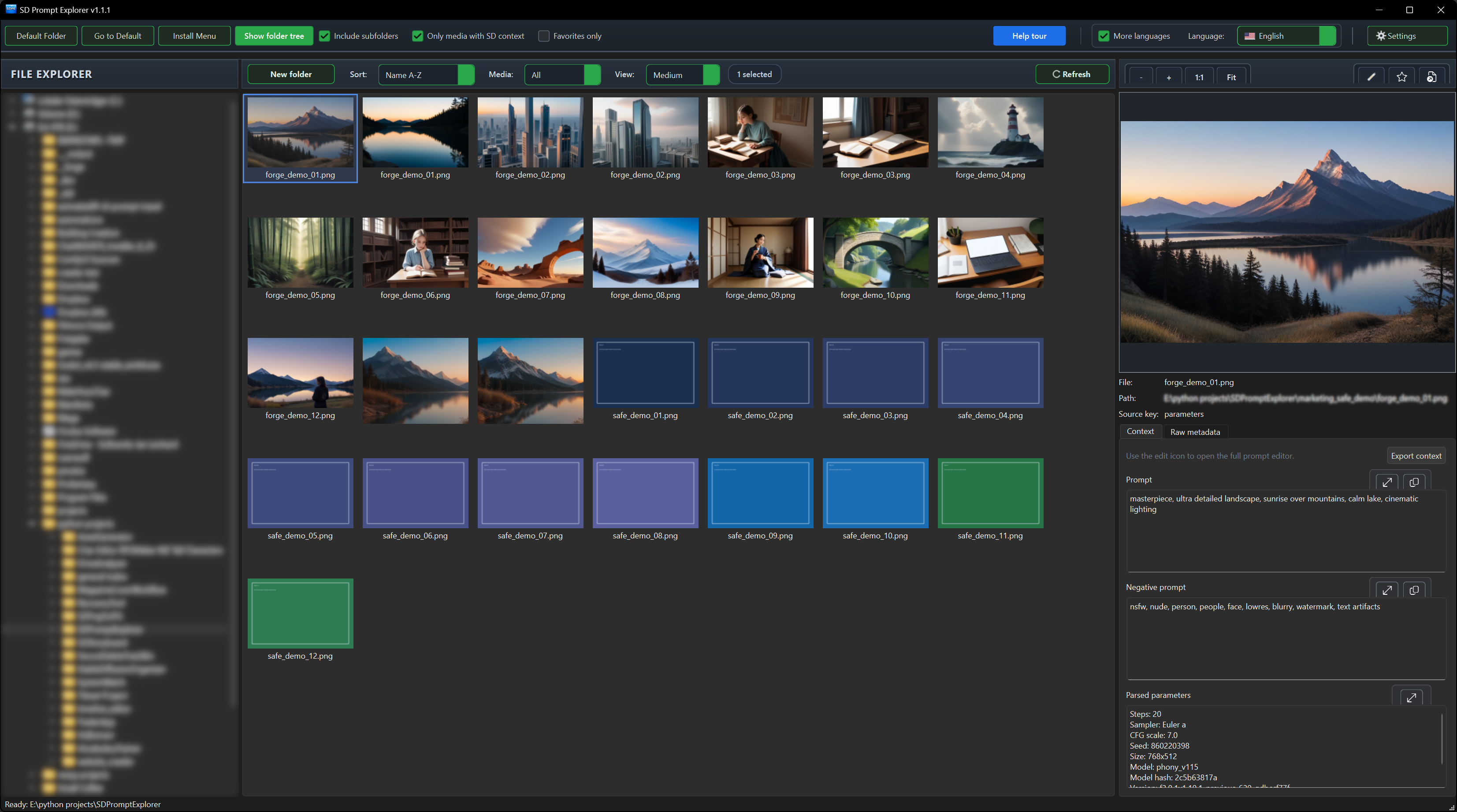
SDPromptExplorer (Stable Diffusion Prompt Explorer) is a focused desktop utility for working with Stable Diffusion image outputs.
Open a folder, scroll through PNGs, and instantly inspect Prompt, Negative Prompt, Parsed Parameters, and Raw Metadata on the right side.
No constant tab switching, no manual re-uploading, no one-image-at-a-time workflow.
=== Updates ===
v1.0.2:
- New: Added cross-tool handoff from SDPngToJPG to SDPromptExplorer via context menu (Open in SD Prompt Explorer).
- Improved: The handoff now resolves to the installed edition reliably (Basic/Pro) using the active Explorer integration.
- Fixed: Removed stale fallback behavior where the wrong edition could open after menu changes.
- Fixed: Uninstalling the Prompt Explorer menu now also cleans related handoff entries to avoid ghost context actions.
v1.1.1:
This update delivers a major UI/UX polish pass, more stable scanning/opening behavior, and several quality-of-life improvements for daily SD media workflow.
- Refined interface (header, gallery controls, preview controls)
- Better readability for long file/path values (ellipsis + tooltip)
- More robust `Open externally` behavior for long Windows paths
- Updated guided help tour aligned with the current UI
- Folder-tree context menu removed (safety/usability reasons)
- Multiple translation and consistency improvements
=============
## Editions
### Basic (Standard)
Free / Name your own price.
Includes:
- Explorer-like folder tree + fast thumbnail gallery
- Keyboard navigation through images
- Prompt / Negative Prompt / Parsed Parameters / Raw Metadata
- One-click copy for Prompt and Negative Prompt
- Favorites workflow (dated favorites folders)
- Zoom preview + large popup preview
- Open image in Windows editor
- Multi-language UI
- Windows context menu install/remove from inside the app
### Pro (in development)
12,99 € one-time.
Includes everything in Basic, plus:
Planned Pro Features (Teaser / Roadmap)
- Direct handoff to running SD instances (Forge, A1111, ComfyUI) with auto-detection and target profiles.
- Integrated Forge Studio inside the Explorer (generate, progress, queue/stop, fast iteration without app switching).
- Region-based image tools: ROI selection, refine selected region, upscale selected region.
- One-click image-to-video (Video SDPE) with presets (e.g. 3s/5s/8s/12s, optional loop).
- ComfyUI workflow registry (I2V/T2V/V2V) with swappable presets and clean handoff.
- “Regenerate similar video” based on stored generation context data.
- Extended prompt workspace (open/edit/expand prompt & negative prompt, snippets/assistive helpers).
- Pro integration panel with runtime status, connection tests, diagnostics, and more resilient retry flows.
- Batch workflows for multiple selected media with progress tracking and cancel control.
- Modular Pro add-ons as a next step (instead of one monolithic update).
## Platform
Windows 10/11
## License
One-time purchase, no subscription.
## Feedback
If you find bugs or have feature requests, please leave a comment.
Have Fun!
Yossaya
Download
Click download now to get access to the following files:
Development log
- Version 1.1.1 (Basic) is live21 days ago
- Finally Released30 days ago
Comments
Log in with itch.io to leave a comment.
Pro version is currently being reworked.